A Food Photo and a Motion Concept Need Different Review Notes
A food photograph records the appearance of a dish at a particular moment. A generated motion concept starts from an image and proposes movement around it. Those two files may share a colour palette and composition, but they should not be described as the same kind of evidence. For a recipe blog, the distinction matters whenever a reader could interpret a visual as a demonstration of preparation, texture or serving size.
Consider a hypothetical planning example: a food blogger has an original photograph of a small cake beside an empty plate. The blogger wants a short visual introduction for a social post. The recipe photographs and written instructions already explain the actual dish. A motion concept might provide a separate decorative introduction, provided its role is clear and its content survives review. This article describes that planning process; it does not report a tested recipe or a first-hand trial of a generated clip.
Record what the photograph establishes
Start with the original image, its source file and a short description of what is visible. Note the position of the dish, the number of servings shown, the arrangement of any garnish and the direction of the light. Keep this description concrete. A photograph can show a sliced surface or a plated portion, but it does not independently establish the full ingredient list, cooking temperature or nutritional content.
Separate the visual description from the recipe record. Measurements, timings and substitutions belong in the checked recipe text. Do not ask a generated visual to supply an omitted step or confirm that a dish has reached a safe cooking temperature. If the intended post needs a factual demonstration, use an authentic photograph or recording of that demonstration, with an explanation of what was actually observed.
Write a narrow brief for the proposed motion
Decide why motion is being considered. A quiet background treatment, a short opening scene or an exploratory idea for a later shoot each requires a different brief. Describe one intended treatment and identify the details that should remain recognisable. For the hypothetical cake image, the notes might specify a restrained composition and a consistent plate arrangement, with no new ingredients or preparation steps.
A brief is a request rather than a promise about the result. Generated movement can introduce unexpected changes, so include a review condition: reject a concept if the cake shape, garnish, utensils or plate count changes in a way that could mislead a reader. The review notes should also say whether the clip is decorative. That decision helps an editor judge the asset against its intended use instead of treating every attractive frame as suitable.
Keep preparation separate from presentation
An original recipe photograph, a behind-the-scenes recording and a generated visual concept can sit in separate folders. Give each a clear filename and retain the corresponding source. A record such as “original food photo” or “AI-generated motion concept from an owned photo” is more useful than a generic filename that conceals how the asset was made.
The separation should carry through to the post itself. If a clip depicts an imagined scene, avoid placing it beside wording that suggests it is a recording of the recipe being made. Use the authentic recipe images where readers need to inspect the dish. A decorative introduction can be considered separately, with wording appropriate to the asset and the context in which it will appear.
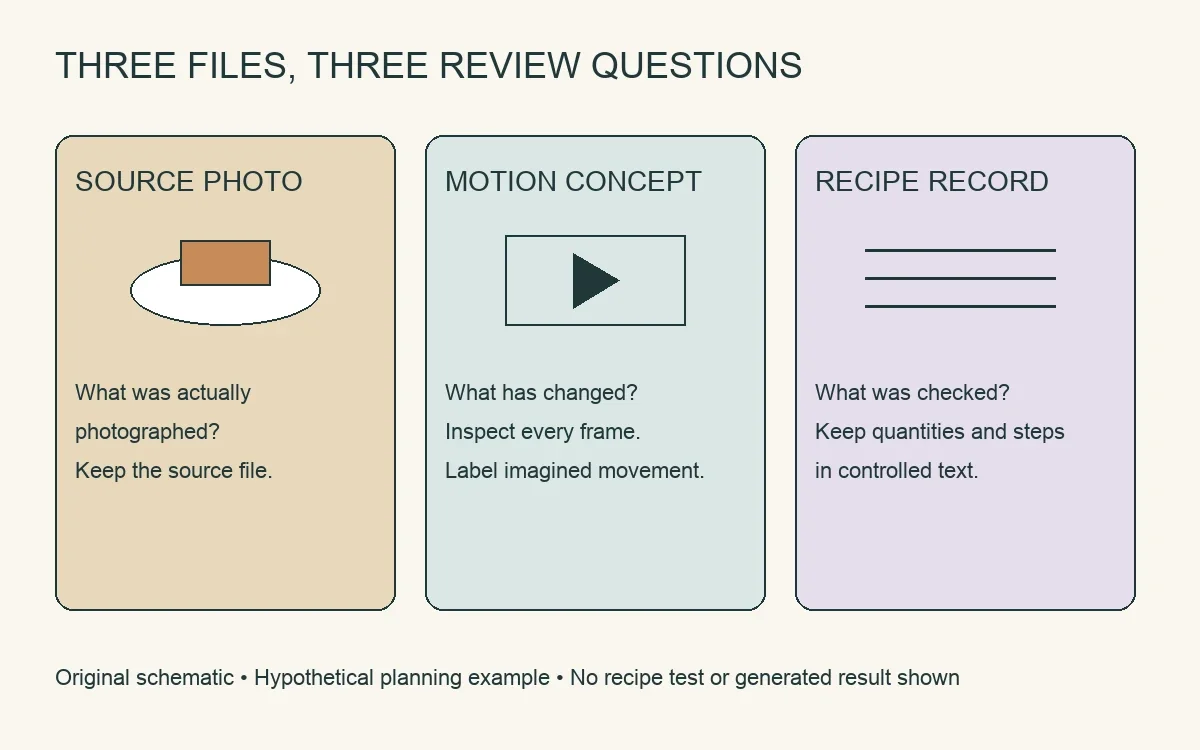
Original planning diagram: distinguish the source photograph, the proposed visual treatment and the recipe record. Hypothetical example; no recipe test or generated result is depicted.
Create a concept from an image you can use
A creator who wants to explore a motion treatment can start with an owned food photograph. an image-to-video workflow offers a starting-image workflow with an optional motion description and a result that can be previewed and downloaded. Inspect the output before deciding whether it belongs in the final post. Generating a file is one stage of preparation, not editorial approval.
Use a source whose permissions cover the intended upload and adaptation. Avoid uploading a photographer’s work simply because it appears on a public page. If an image was commissioned, check the agreed scope before making a derivative visual. Retain a copy of the source and its permission record so the editor can trace the relationship between the original photograph and the proposed clip.
Review food details across the whole clip
Watch the beginning, middle and end, then pause at any point where an object changes. Compare the clip beside the source image. Check the number of pieces, the position of the cut surface, the appearance of utensils and the arrangement of garnish. Look for a plate edge that bends, a topping that disappears or a second object that was not in the photograph.
Check for changes that could imply a different recipe. A sauce appearing unexpectedly or an ingredient changing colour might give a reader the wrong impression about the actual dish. Motion also should not imply a cooking or serving step that never occurred. If a discrepancy is meaningful, set the concept aside and use a still image or an authentic recording. A simpler asset can meet the brief without introducing uncertainty.
Add essential text in a controlled layer
Keep the recipe name, quantities and preparation instructions in the publishing or editing tool where they can be written and checked directly. Do not rely on text embedded in a generated image or clip for information a reader needs to follow. Place the wording where it remains readable and verify it again in the exported file.
A caption should describe the specific asset. If the visual is a generated concept, say so where that distinction matters to understanding the post. Avoid describing a proposed scene as a tested technique. Provide the important recipe information as ordinary text, and include a useful static image for readers who do not play the clip. Review the arrangement on a phone as well as a larger screen.
Keep the final decision traceable
Save the selected asset, its source photograph, the brief and the review notes together. Record any edits made after review. A later crop, caption change or replacement clip can alter what a reader sees, so inspect the published version rather than assuming the earlier preview is identical. Check that the recipe link and accompanying description still refer to the correct dish.
The final post should give readers a clear relationship between the files. Authentic photographs show the documented dish. Checked text supplies the recipe information. An optional generated concept serves a defined presentation purpose and remains subject to review. Clear notes help a food creator decide whether each asset supports that purpose without turning an exploratory visual into an unsupported factual claim.
About the contributor
Keep a narrated introduction separate from recipe evidence
A fictional presenter can introduce the food-photo planning workflow with Magic Hour AI lip sync, which matches mouth movements to an audio track. Use permitted presenter footage and narration, label synthetic material, and check timing and captions. The narration explains an idea; it must not suggest that the presenter cooked or tested the hypothetical cake.
For a separate creative experiment, describe an imagined food-story illustration in a written prompt and explore it with Magic Hour AI video generator. Keep the result labelled as generated imagery, compare it with the storyboard and retain a still alternative; the generated scene is not evidence of a real event or a tested outcome.
An owned still can also serve as the starting point for Magic Hour image to video AI. Review any invented movement against the intended scene, retain the original image and label the moving version as a generated interpretation.
Magic Hour provides online visual-media creation tools. The company contributed this original AI-assisted article for publisher editorial review. Its cake example is hypothetical; it does not describe first-hand cooking, recipe testing or a completed review of a generated clip.